# Find the best prompt and model
The prompt testing feature helps you to
1. Ensure you can safely change prompts and models without degrading model output quality in critical ways and
2. Find the best prompt and a model combination for your use case.
With Root or custom evaluators, you can fully automate a large battery of evaluation runs, skip the manual "eyeballing" of LLM outputs and iterate quickly.
You can compare metrics such as speed, cost, and output quality by checking the evaluation results.
Each test suit definition is reproducible and suitable to add as a gate to a CI/CD pipeline.
### Example: User feedback analyzer
Let's say you are running a SaaS product and you want to analyze and categorize user feedback. You want to find a good compromise between speed and quality in your model choice.
Let's start by installing the CLI and creating a prompt-tests.yaml file.
```bash
curl -sSL https://scorable.ai/cli/install.sh | sh
```
Then replace the placeholder content of the `prompt-tests.yaml` file with the following:
```yaml
prompts:
- |-
Analyze the SaaS user feedback
Text: {{user_input}}
inputs:
- vars:
user_input: "The dashboard takes forever to load when I have multiple projects. It's frustrating to wait every time I log in."
- vars:
user_input: "I really like the new search bar—it makes finding reports much easier. Could you also add filters by date range?"
- vars:
user_input: "The mobile app crashes whenever I try to upload a file larger than 50MB. This makes it unusable for my team."
- vars:
user_input: "Loving the collaboration features—comments and mentions are working perfectly. Keep it up!"
- vars:
user_input: "The analytics reports look great, but it would be useful to export them directly to Excel or Google Sheets."
models:
- "gemini-2.5-flash-lite"
evaluators:
- name: "Non-toxicity"
- name: "Compliance-preview"
contexts: # The policy rules (e.g. from system prompt) for the compliance evaluator
- |-
Product Feedback Categorization — Quick Guide
Sentiment: Positive / Negative / Neutral
Pick strongest tone; sarcasm = negative.
Feature Area: Choose the main part of the product (e.g., Dashboard, Mobile, Notifications, Analytics, Billing, Integrations, Security).
Request Type:
Bug Report → something broken
Usability Issue → hard/confusing to use
Feature Request → asking for new capability
Praise → compliment only
Question → info-seeking
Priority:
High → blockers, crashes, security/data loss
Medium → frequent bugs, core slowdowns, widely requested features
Low → cosmetic, niche, one-off confusion
Process: Read → assign sentiment → pick feature area → classify request → set priority.
```
We define one prompt template with five different inputs. We use two Root evaluators, where the compliance evaluator has a policy definition it uses to assess the LLM output.
Run the prompt testing with the following command:
```bash
roots prompt-test run
```
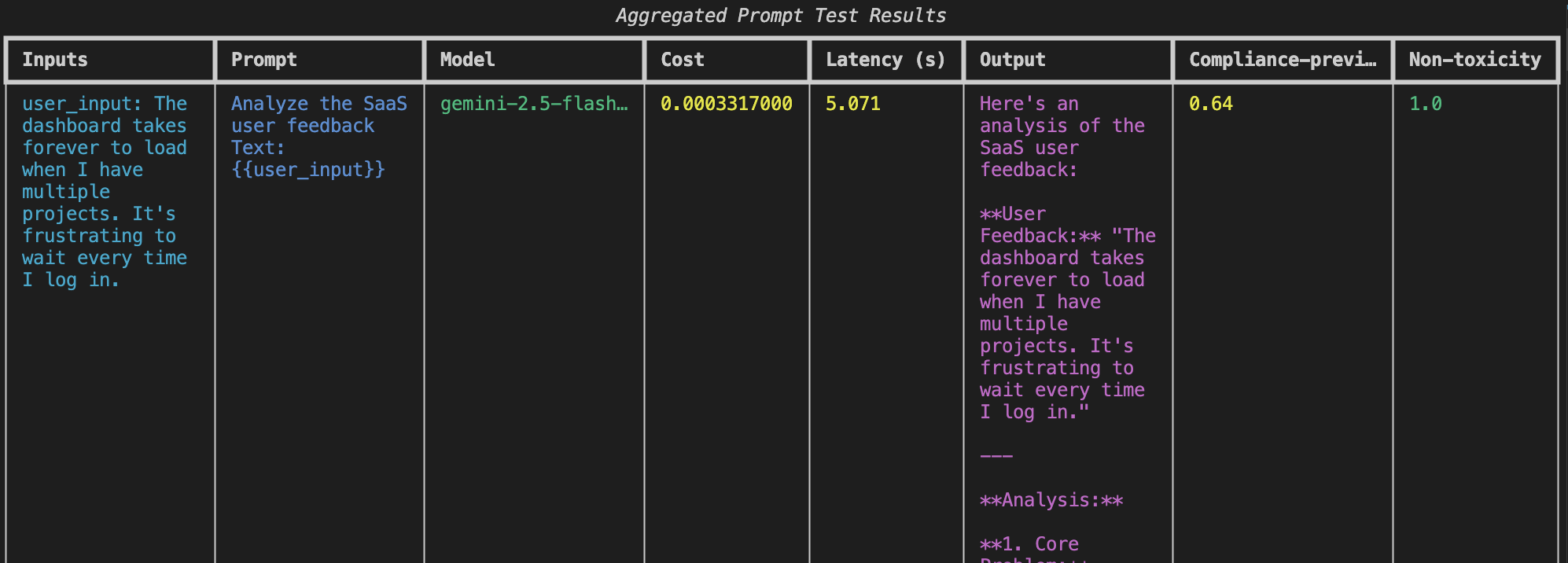
Results show the evaluation scores, latencies, outputs, and costs
#### Adding comparisons and structured output
Parsing raw text results is not the best way to build further integrations. So, let's add a section to the YAML file to define the output schema.
```yaml
response_schema:
type: "object"
required: ["sentiment", "feature_area", "request_type", "suggested_priority"]
properties:
sentiment:
type: "string"
description: "Overall sentiment (e.g., negative, neutral, positive)"
feature_area:
type: "string"
description: "Primary product area referenced in the feedback"
request_type:
type: "string"
description: "Type of request (e.g., bug report, feature request, praise, usability issue)"
suggested_priority:
type: "string"
description: "Suggested priority (e.g., low, medium, high)"
additionalProperties: false
```
Let's also add another model and another, more detailed prompt. Here is the fully updated definition file:
```yaml
prompts:
- |-
You are a customer feedback analyzer for a SaaS product.
Your job is to read user feedback messages and return a structured JSON output.
- If multiple features are mentioned, pick the primary one.
- If sentiment is mixed, pick the strongest overall tone.
- If request_type is unclear, infer based on wording.
{{user_input}}
- |-
Analyze the SaaS user feedback
Text: {{user_input}}
inputs:
- vars:
user_input: "The dashboard takes forever to load when I have multiple projects. It's frustrating to wait every time I log in."
- vars:
user_input: "I really like the new search bar—it makes finding reports much easier. Could you also add filters by date range?"
- vars:
user_input: "The mobile app crashes whenever I try to upload a file larger than 50MB. This makes it unusable for my team."
- vars:
user_input: "Loving the collaboration features—comments and mentions are working perfectly. Keep it up!"
- vars:
user_input: "The analytics reports look great, but it would be useful to export them directly to Excel or Google Sheets."
models:
- "gemini-2.5-flash-lite"
- "gpt-5"
evaluators:
- name: "Non-toxicity"
- name: "Compliance-preview"
contexts:
- |-
Product Feedback Categorization — Quick Guide
Sentiment: Positive / Negative / Neutral
Pick strongest tone; sarcasm = negative.
Feature Area: Choose the main part of the product (e.g., Dashboard, Mobile, Notifications, Analytics, Billing, Integrations, Security).
Request Type:
Bug Report → something broken
Usability Issue → hard/confusing to use
Feature Request → asking for new capability
Praise → compliment only
Question → info-seeking
Priority:
High → blockers, crashes, security/data loss
Medium → frequent bugs, core slowdowns, widely requested features
Low → cosmetic, niche, one-off confusion
Process: Read → assign sentiment → pick feature area → classify request → set priority.
response_schema:
type: "object"
required: ["sentiment", "feature_area", "request_type", "suggested_priority"]
properties:
sentiment:
type: "string"
description: "Overall sentiment (e.g., negative, neutral, positive)"
feature_area:
type: "string"
description: "Primary product area referenced in the feedback"
request_type:
type: "string"
description: "Type of request (e.g., bug report, feature request, praise, usability issue)"
suggested_priority:
type: "string"
description: "Suggested priority (e.g., low, medium, high)"
additionalProperties: false
```
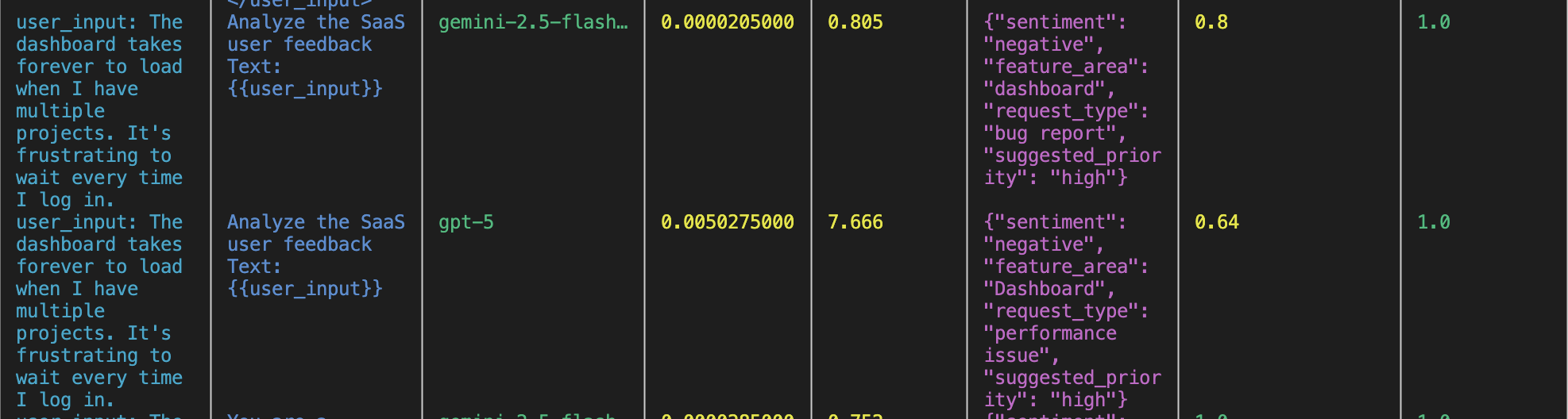
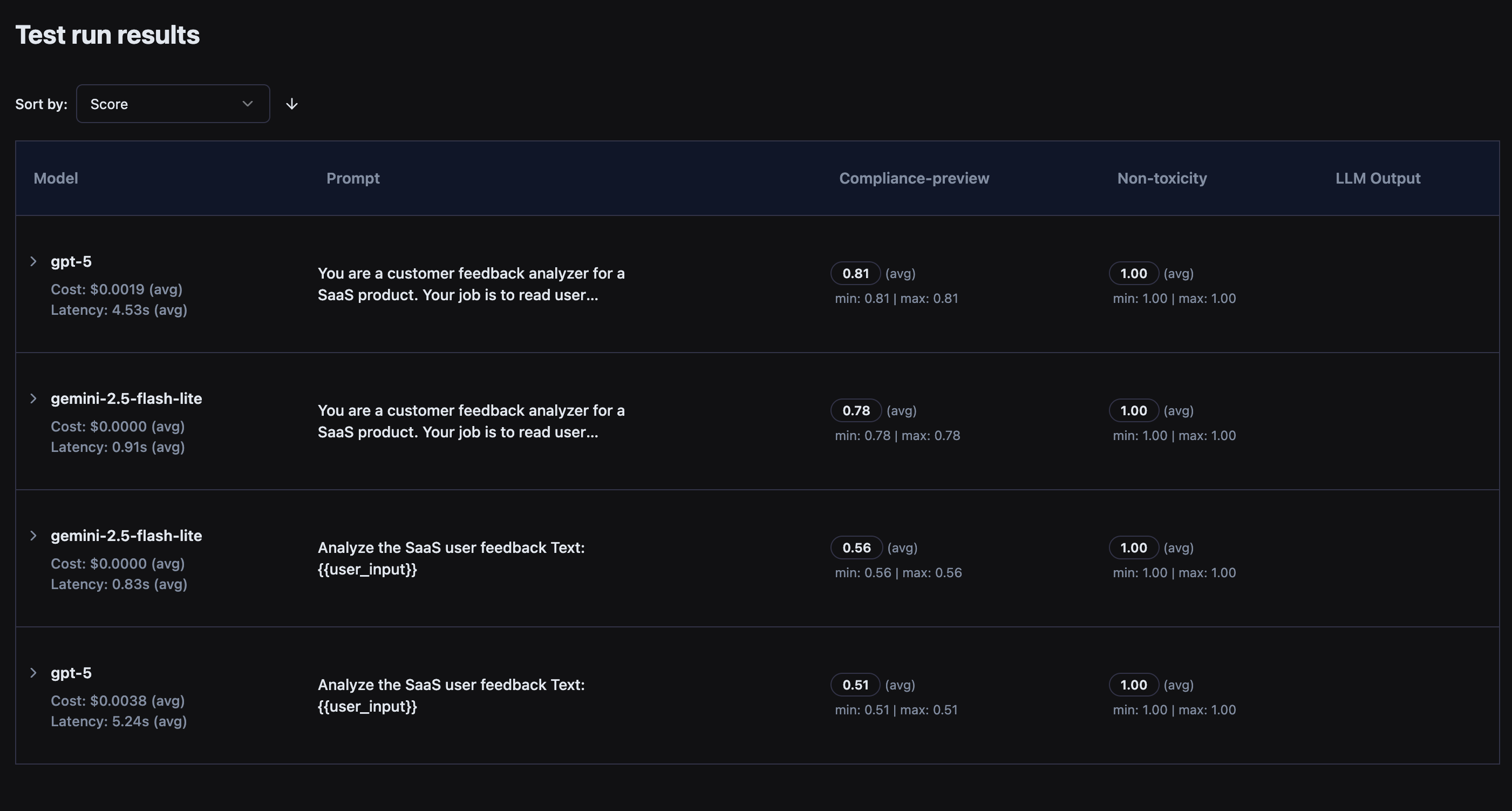
When we run this, we can see that the Gemini model is fast and cheap, but gets a lower score from the policy compliance evaluator in comparison. GPT-5 is considerably slower but receives a better score.
You can also inspect the results in the browser.